
How to design an AI agent in 2026: the system design, block by block
If you built an AI agent from scratch today: the 10 blocks to attach, what goes inside each one, and why the data layer decides whether the rest works.

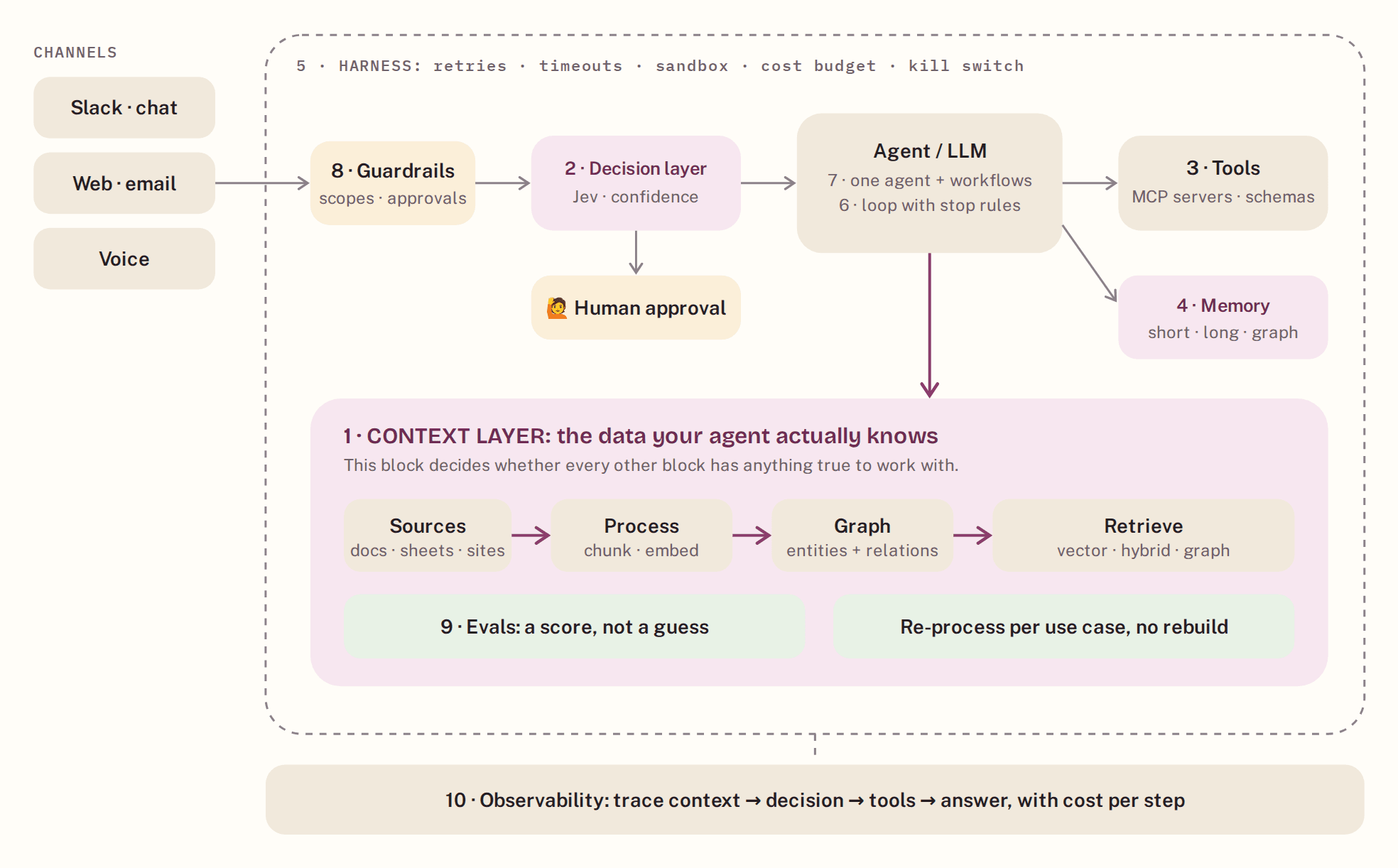
If I were building an AI agent from scratch today, I'd make ten decisions before writing a single prompt. Here's the whole system on one page, then each block you attach: what goes inside it, the steps to add it, and the trick that saves you a week.
Try GuidedMind.ai free →
The whole system. Numbers match the ten blocks below. The plum block is where most agents quietly fail.
Read it like a build list
Every section below is one block you attach to the system. Each one has the same five parts, so you can skim to what you need:
- What's inside: The parts the block is made of, as a checklist.
- Steps to attach it: The order to add those parts in, without rework.
- The trick: The one thing that saves the most time later.
- Go deeper: The design details that matter once it's live.
- Read more: The research papers each block is built on.
💻 Get the code. Every block in this article is a small Python module in our open-source boilerplate: context, decisions, tools, memory, harness, loop, guardrails, evals and tracing, wired into a working agent with offline tests. Boilerplate on GitHub →
Half of the ten blocks (context, memory, tools, evals and observability) are really about one question: what does your agent actually know, and how do those facts connect? That's why the context layer comes first and gets the most space.
1 · Context layer: don't build your own RAG pipeline
Attach first · the data layer
"RAG" isn't one technique anymore. Plain vector search, hybrid search with keywords, GraphRAG, agentic retrieval, corrective retrieval, multimodal. The right one depends on the questions your users ask, and you will want to switch as you learn. Hand-building one pipeline locks you into the first guess and buries you in a data-layer rabbit hole: chunking, embeddings, vector databases, re-indexing.
So instead of a pipeline, attach a context layer: one place where your documents are processed, turned into a knowledge graph, retrieved the right way per use case, and tested and traced before your agent depends on them.
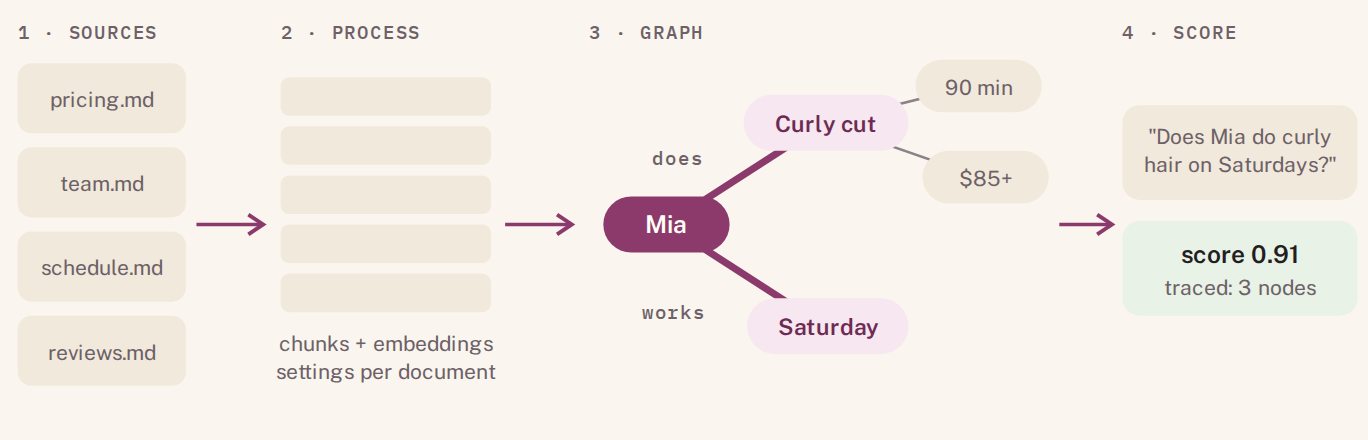
Vector search finds paragraphs that look similar. A graph follows how facts connect, and a score tells you if it worked.
What's inside
- Connected sources: docs, sheets, websites
- Processing per document: chunking and embeddings that fit that document
- A knowledge graph: entities and the relations between them
- Several retrieval methods: vector, keyword + vector (hybrid), graph
- A test set with scores, and a trace of what every query retrieved
Steps to attach it
- Upload the documents your agent must answer from.
- Write 20–50 real user questions, including ones that need two documents at once.
- Run them with plain vector retrieval and record the scores.
- Turn on the graph (or hybrid) for the questions that failed, and compare the scores.
- Keep the method that wins per use case; re-process documents without rebuilding the agent.
- Expose it to your agent through one tool: API, SDK, MCP or an n8n node.
💡 The trick: the questions that break plain RAG are relationship questions ("who approved it, and under which contract?"). Put at least five of them in your test set from day one. If they pass, the easy ones will too.
🧠 With GuidedMind.ai: this whole block is no-code. Upload documents, tune processing per document, switch between vector, hybrid and knowledge-graph retrieval, and test it with scores and traces before your agent depends on it. Your agent connects through the API, SDK, MCP or the n8n node, so you build the logic, not the plumbing. Try it free →
Go deeper
Chunk for the question, not the document. Small chunks (a few hundred tokens) win on precise lookups like a price or a policy line; section-sized chunks win on "explain" questions. That's why processing settings should be per document, not global.
Hybrid search catches what embeddings blur. Names, product codes, SKUs and error IDs are exactly where vector search is weakest. Keyword search (BM25) catches them, vector search catches paraphrases, and rank fusion combines both.
When the graph pays off. Multi-hop questions ("which clients are on plans that include X?") and global questions that summarize across many documents are where a knowledge graph beats similar-looking paragraphs. The cost moves to indexing time, when entities and relations are extracted, so plan how updates re-process documents.
Order and amount matter in the prompt. Models use facts at the start and end of a long context more reliably than facts in the middle. Send fewer, better facts, best first.
Grade before you trust. If retrieval scores low, don't answer anyway: rewrite the query and retry, or say you don't know. Corrective and self-reflective RAG formalize exactly this step.
📚 Read more: the research behind this block
- Retrieval-Augmented Generation for Knowledge-Intensive NLP Tasks — Lewis et al., 2020 · arXiv:2005.11401. The paper that named RAG: retrieval plus generation, trained together.
- Retrieval-Augmented Generation for Large Language Models: A Survey — Gao et al., 2023 · arXiv:2312.10997. The map of naive, advanced and modular RAG, with the techniques in each.
- From Local to Global: A Graph RAG Approach to Query-Focused Summarization — Edge et al., 2024 · arXiv:2404.16130. Microsoft's GraphRAG: entity graphs and community summaries for questions across a whole corpus.
- Corrective Retrieval Augmented Generation — Yan et al., 2024 · arXiv:2401.15884. Grade retrieved documents and correct course when they're weak.
- Self-RAG: Learning to Retrieve, Generate, and Critique through Self-Reflection — Asai et al., 2023 · arXiv:2310.11511. Retrieve only when needed and critique your own evidence.
- Lost in the Middle: How Language Models Use Long Contexts — Liu et al., 2023 · arXiv:2307.03172. Why more context isn't better context, and where to put the facts that matter.
2 · Decision layer: stop writing a condition for every scenario
Attach · business logic
Every agent has business logic: is this a booking, a refund, a complaint, a sales lead? Most teams start with an if-statement per scenario, then a switch node, then a giant prompt. Each works until the number of scenarios grows, and none of them tells you how sure the decision was. That missing number is what decides when a human should step in.
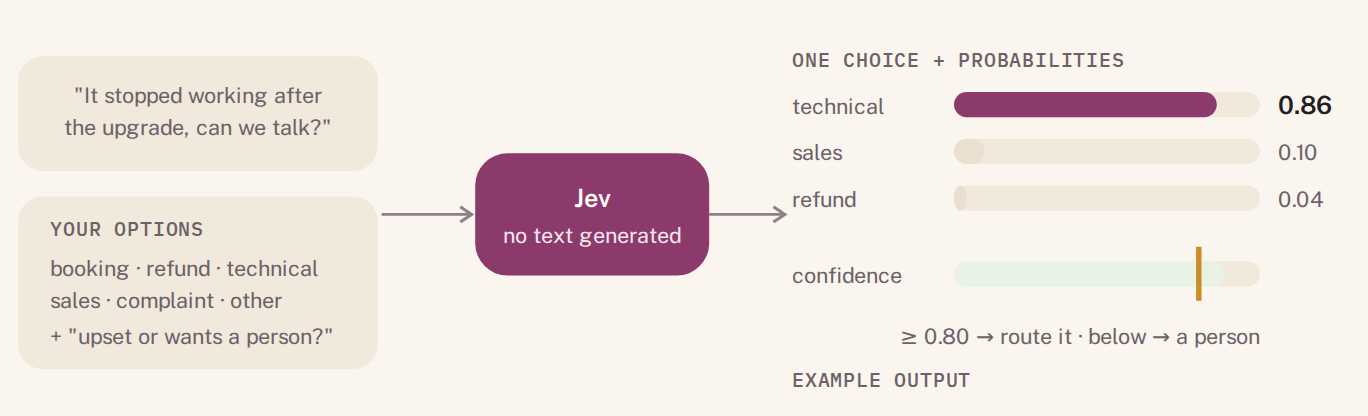
A decision model returns a choice and how sure it is. The threshold line is where you hand off to a human.
| Option | Good at | Breaks when |
|---|---|---|
| If/else conditions | Two or three fixed cases | Customers phrase things you didn't predict |
| Workflow switch nodes | Visible routing in n8n or Make | Every new scenario adds a branch and a keyword list |
| Decision tables (DMN) | Auditable, rule-based domains | Inputs are messy free text |
| LLM classifier prompt | Flexible, understands free text | You need to know how sure it was; outputs can drift |
| Decision model (e.g. Jev) | One choice + probabilities + confidence, no text | You skip calibrating the threshold on real data |
What's inside
- A written list of options, one line of criteria each
- A decision call that returns a choice, the probabilities and a confidence
- A threshold that sends low-confidence or upset customers to a person
- Thin branches: each one does one job
Steps to attach it
- List every scenario as an option with a one-line description.
- Add one yes/no question for "upset or asking for a person".
- Route on the chosen option; route anything under your threshold to a human.
- Run a few hundred past messages through it and check that 0.80 really means 80%.
How Jev works: Jev by TypeSafe AI is a decision model rather than a text model. You send the state (the customer message plus any facts) and your questions in one request. A choice question picks one option and returns the full probability distribution and a confidence; a score question returns a number; a yes/no question returns a probability. Several questions can go in one call and are evaluated in parallel. Jev is in early access, so treat its speed and price figures as TypeSafe's own and measure on your data.
💡 The trick: feed the decision the facts from your context layer, not just the message. "Customer on the Pro plan, contract renews Friday" turns an ambiguous message into an obvious one.
Go deeper
Calibrated means 0.8 is right about 80% of the time. Check it with a reliability table: bucket a few hundred past decisions by confidence (0.5–0.6, 0.6–0.7, …) and compare each bucket's confidence with its real accuracy. If 0.8 is only right 65% of the time, raise the threshold.
Pick the threshold with money, not taste. The threshold trades coverage (how much runs automatically) against risk (how often an automatic action is wrong). Set it where the cost of a wrong automatic action meets the cost of a person's minute. This is selective prediction: answer when sure, abstain otherwise.
Design the options like a form, not a vibe. Options should not overlap, each needs a one-line description, and there should be an "other" option. Bare labels without descriptions measurably lower confidence.
A text model's "I'm 90% sure" is not a probability. Confidence an LLM writes in its answer tends to be overconfident. A decision model that returns a probability distribution gives you a number you can calibrate.
📚 Read more: the research behind this block
- On Calibration of Modern Neural Networks — Guo et al., 2017 · arXiv:1706.04599. Why accurate models can still be badly calibrated, and how to measure it.
- Selective Classification for Deep Neural Networks — Geifman & El-Yaniv, 2017 · arXiv:1705.08500. The math of "answer only when confident": trading coverage for risk.
- Language Models (Mostly) Know What They Know — Kadavath et al., 2022 · arXiv:2207.05221. When model probabilities are calibrated, and when they aren't.
- Can LLMs Express Their Uncertainty? An Empirical Evaluation of Confidence Elicitation in LLMs — Xiong et al., 2023 · arXiv:2306.13063. Why confidence written in text tends to be overconfident.
3 · Tools: plug in MCP, don't wrap every API
Attach · actions
Writing a custom wrapper for every service is the slowest way to give an agent hands. Most services now ship an MCP server, and one MCP connection gives your agent a whole set of well-described tools. What's left for you is the part that matters: fewer, clearer tools.
What's inside
- MCP servers for the services you use (chat, drive, calendar, databases)
- Names in
verb_nounform:search_knowledge,create_booking - Strict input schemas with required fields
- Errors that say how to recover, not just "failed"
Steps to attach it
- List the actions the agent truly needs. Usually fewer than ten.
- Connect MCP servers for those services first.
- Wrap only what's missing, with a strict schema.
- Give knowledge lookups one tool that talks to your context layer.
💡 The trick: if two tools could answer the same request, the model will guess between them. Merge them or make their descriptions mutually exclusive.
Go deeper
Tool descriptions are prompts. The model decides from the name, the description and the schema alone. Say when to use the tool and when not to, and what it returns.
Return less, structured. A tool that returns 5,000 tokens of raw JSON burns context and buries the answer. Return the fields the agent needs, paginate the rest.
Make writes idempotent. Pass an idempotency key with every write, so a retry after a timeout can't book or charge twice.
Scope tools per task. Fewer visible tools means better tool choice. That's why each branch in the boilerplate sees only its own tools.
📚 Read more: the research behind this block
- Toolformer: Language Models Can Teach Themselves to Use Tools — Schick et al., 2023 · arXiv:2302.04761. How models learn when and how to call an API.
- Gorilla: Large Language Model Connected with Massive APIs — Patil et al., 2023 · arXiv:2305.15334. Retrieval over API docs to pick the right call among thousands.
- ToolLLM: Facilitating Large Language Models to Master 16000+ Real-world APIs — Qin et al., 2023 · arXiv:2307.16789. Training and evaluating tool use at scale.
- Model Context Protocol specification — modelcontextprotocol.io. The open standard for connecting agents to tools and data.
4 · Memory: three layers, not one giant chat history
Attach · continuity
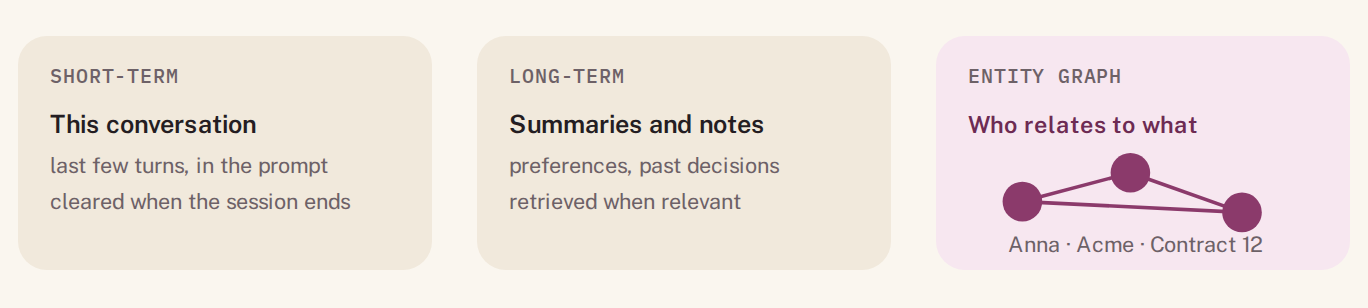
Dumping the whole history into every prompt is slow, expensive, and still forgets who's who.
What's inside
- Short-term: the current session's recent turns
- Long-term: summaries and facts worth keeping
- An entity graph: people, projects, clients and how they relate
Steps to attach it
- Cap short-term memory at the last N turns.
- After each session, save a summary to long-term memory.
- Extract entities and relations into the graph as they appear.
- Retrieve from long-term and graph memory only when the question needs it.
🧠 With GuidedMind.ai: the GuidedMind n8n node includes short- and long-term agent memory next to the knowledge base, so memory and documents live in the same context layer.
Go deeper
Decide what's worth remembering. Store facts that change future behavior (preferences, commitments, relationships), not every message.
Update, don't overwrite. When a fact changes ("Anna moved to Beta Corp"), mark the old one invalid with a date instead of deleting it. Temporal knowledge graphs do exactly this, so the agent can answer both "where is she now?" and "where was she in March?"
Retrieve by relevance, recency and importance. A good memory lookup blends all three, not just similarity.
Memory is part of your eval set. Add questions that only work if something from a past session was remembered.
📚 Read more: the research behind this block
- MemGPT: Towards LLMs as Operating Systems — Packer et al., 2023 · arXiv:2310.08560. Paging memory in and out of a limited context, like an operating system.
- Generative Agents: Interactive Simulacra of Human Behavior — Park et al., 2023 · arXiv:2304.03442. Memory streams, reflection, and retrieval by recency, importance and relevance.
- Zep: A Temporal Knowledge Graph Architecture for Agent Memory — Rasmussen et al., 2025 · arXiv:2501.13956. Agent memory as a knowledge graph that tracks when facts were true.
- Mem0: Building Production-Ready AI Agents with Scalable Long-Term Memory — Chhikara et al., 2025 · arXiv:2504.19413. Extracting, consolidating and retrieving memories, including a graph variant.
5 · Harness: the frame everything runs inside
Attach from day one · safety net
The harness is the runtime around your agent: it calls the model, runs the tools, retries what failed and stops what's running away. Without one, a single bad loop can burn a month of budget overnight, and a flaky API turns into a confused answer. You don't need to build it yourself. Agent SDKs (Claude Agent SDK, OpenAI Agents SDK), frameworks like LangGraph, and workflow tools like n8n all give you most of a harness. Your job is to set its limits on purpose.
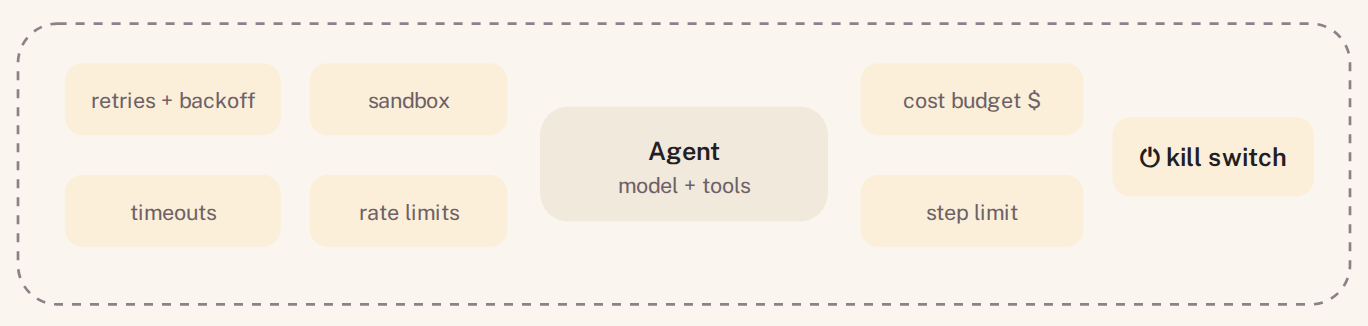
The harness sets the limits. The agent works inside them.
What's inside
- Retries with backoff, and timeouts per call
- A sandbox for any code the agent runs
- A hard token and cost budget per conversation
- Rate limits, and a kill switch you can flip
- Idempotent tools, so a retry never books twice
Steps to attach it
- Pick a runtime (an agent SDK, LangGraph or n8n) instead of writing your own loop.
- Set a per-conversation cost ceiling before the first real user.
- Add retries only to calls that are safe to repeat.
- Wire an alert and a kill switch to the budget.
💡 The trick: set the cost ceiling per conversation, not per month. A monthly cap tells you about a runaway loop after it has already eaten the budget.
Go deeper
The harness owns the agent–computer interface. How tools present results, how errors read and how files are shown changes success rates as much as the model does. The SWE-agent research made this concrete for coding agents.
Manage the context window. Long runs need compaction: summarize old steps, truncate large tool outputs, keep the task and the latest state at the top.
Keep secrets out of prompts. Credentials live in the harness and are injected into tool calls, never into text the model can repeat.
Make runs replayable. Store inputs, tool results and model outputs per step, so you can re-run a failed conversation exactly when you debug.
📚 Read more: the research behind this block
- SWE-agent: Agent-Computer Interfaces Enable Automated Software Engineering — Yang et al., 2024 · arXiv:2405.15793. Evidence that interface design around the model changes what the agent can do.
- Building effective agents — Anthropic, 2024. Workflows vs. agents, and the simple patterns that work in production.
6 · Loops: write down what "done" means
Attach · control
An agent loop is plan, act, check, repeat. Most loops that spiral never had a definition of done. Write one per task, and make the agent check it after every step.
What's inside
- A maximum number of steps
- A success check after each step
- A written "done" definition per task
- A no-progress detector: same action twice → stop
Steps to attach it
- Write the done definition in one sentence.
- Add a self-check step that compares the result to it.
- Stop and escalate on no progress, not just on the step limit.
Go deeper
Reason, act, observe, repeat. Interleaving reasoning with actions (ReAct) is the default loop for tool-using agents.
Reflection works when there's a real signal. Retrying after a failed test, a tool error or a failed eval check improves results. Asking the model to critique itself with no external signal often doesn't, and can make answers worse.
So make "done" checkable. A done definition the code can verify (a field is filled, a test passes, a booking ID exists) is worth more than "looks complete".
📚 Read more: the research behind this block
- ReAct: Synergizing Reasoning and Acting in Language Models — Yao et al., 2022 · arXiv:2210.03629. The reason-act-observe loop most agents use today.
- Reflexion: Language Agents with Verbal Reinforcement Learning — Shinn et al., 2023 · arXiv:2303.11366. Learning from feedback across attempts.
- Self-Refine: Iterative Refinement with Self-Feedback — Madaan et al., 2023 · arXiv:2303.17651. Draft, critique, revise, and when it helps.
- Large Language Models Cannot Self-Correct Reasoning Yet — Huang et al., 2023 · arXiv:2310.01798. The counterweight: self-correction without external feedback often fails.
7 · Orchestration: climb the ladder only when you need to
Attach · structure

Each step up adds coordination cost. Most business agents never need the top step.
Start with one agent and a few tools. When a task has fixed steps, move it into a workflow. Add specialist agents only when tasks genuinely split and don't share context. Your decision layer (block 2) is often all the "orchestration" a business agent needs.
Go deeper
Workflows first, agents where you need judgment. Prompt chaining, routing, parallel calls, orchestrator–workers and evaluator–optimizer cover most business cases before you need autonomous multi-agent systems.
Multi-agent systems fail like organizations. Research on seven multi-agent frameworks found most failures come from unclear specifications, agents misaligned with each other, and weak verification, not from the individual models. Add agents only when tasks truly split and don't share context.
📚 Read more: the research behind this block
- AutoGen: Enabling Next-Gen LLM Applications via Multi-Agent Conversation — Wu et al., 2023 · arXiv:2308.08155. The multi-agent conversation framework many systems build on.
- Why Do Multi-Agent LLM Systems Fail? — Cemri et al., 2025 · arXiv:2503.13657. A taxonomy of 14 failure modes from 1,600+ annotated traces.
- Building effective agents — Anthropic, 2024. The workflow patterns, with when to use each.
8 · Guardrails and approvals: scope every tool, approve what you can't undo
Attach · blast radius
What's inside
- Per-tool scopes: only what that tool needs
- Read tools separate from write tools
- Allowlists for domains, recipients, tables
- PII redaction before logging
- Human approval for payments, sends and deletes
Steps to attach it
- Mark every tool as reversible or not.
- Put an approval step in front of every irreversible one.
- Route low-confidence decisions (block 2) to the same human queue.
Go deeper
Retrieved text is data, not instructions. Web pages, emails and documents can carry hidden instructions (indirect prompt injection). Never let retrieved content grant permissions or trigger writes on its own.
Put the gates at the tools. Separate read and write tools, allowlist destinations, and require approval for anything you can't undo. Output filters help, but the tool boundary is where damage happens.
Test attacks like you test features. Agent security benchmarks give you ready-made injection scenarios to run against your agent.
📚 Read more: the research behind this block
- Not what you've signed up for: Compromising Real-World LLM-Integrated Applications with Indirect Prompt Injection — Greshake et al., 2023 · arXiv:2302.12173. The paper that showed injected content can take over tool-using apps.
- Llama Guard: LLM-based Input-Output Safeguard for Human-AI Conversations — Inan et al., 2023 · arXiv:2312.06674. A classifier approach to input and output safety.
- AgentDojo: A Dynamic Environment to Evaluate Prompt Injection Attacks and Defenses for LLM Agents — Debenedetti et al., 2024 · arXiv:2406.13352. A benchmark to test your agent against injection.
- Identifying the Risks of LM Agents with an LM-Emulated Sandbox — Ruan et al., 2023 · arXiv:2309.15817. ToolEmu: finding risky tool actions before they hit real systems.
9 · Evals: a score, not a guess
Attach before shipping · proof
"It worked when I tried it" is how most agents ship. Evals replace that with a number you can compare before and after every change: new prompt, new model, new documents, new retrieval method.
What's inside
- A golden set built from real user questions
- Retrieval checks: did it fetch the right facts?
- Outcome checks: did the task actually succeed?
- Multi-document questions on purpose
- Exact checks where possible, an LLM judge where not
Steps to attach it
- Collect questions from logs or the people who'll use it.
- Score retrieval separately from the final answer; they fail for different reasons.
- Re-run the set on every change and keep the history.
🧠 With GuidedMind.ai: retrieval testing is built in. Run your questions against the knowledge base, see similarity scores and traces, and compare retrieval methods before your agent depends on them. That's the half of evals most teams skip.
Go deeper
Evaluate three layers separately. Retrieval (did it fetch the right facts: context precision and recall), the decision (right branch, and is the confidence calibrated), and the end-to-end outcome (did the task succeed).
Test consistency, not one lucky run. Run the same conversation several times. An agent that succeeds once in three tries isn't reliable; τ-bench's pass^k metric measures exactly this.
LLM judges have biases. They favor longer answers and certain positions. Check a judge against a small set of human labels before trusting its scores.
📚 Read more: the research behind this block
- RAGAS: Automated Evaluation of Retrieval Augmented Generation — Es et al., 2023 · arXiv:2309.15217. Reference-free metrics for retrieval and faithfulness.
- Judging LLM-as-a-Judge with MT-Bench and Chatbot Arena — Zheng et al., 2023 · arXiv:2306.05685. When LLM judges agree with humans, and their known biases.
- τ-bench: A Benchmark for Tool-Agent-User Interaction in Real-World Domains — Yao et al., 2024 · arXiv:2406.12045. Multi-turn agent evals with simulated users and the pass^k reliability metric.
- AgentBench: Evaluating LLMs as Agents — Liu et al., 2023 · arXiv:2308.03688. A broad benchmark across agent environments.
10 · Observability: trace every answer back to its facts
Attach · debugging

When an answer is wrong, you need to know which step went wrong: the facts it retrieved, the decision it made, or the tool it called. Trace all three, with time and cost per step. For the full run, tools like Langfuse, LangSmith, Arize Phoenix or plain OpenTelemetry work well. For the knowledge part, GuidedMind.ai traces which chunks and graph nodes every query used.
Go deeper
Capture per step: redacted inputs and outputs, model and version, tokens, latency, cost, tool arguments and results, retrieved chunk or node IDs, and the decision with its confidence.
Link traces to evals. Every failed eval case should open the trace that produced it. That's how you tell a retrieval miss from a wrong decision from a broken tool.
Use the standard. OpenTelemetry has semantic conventions for generative AI spans, so traces move between tools instead of being locked into one.
📚 Read more: the research behind this block
- AgentOps: Enabling Observability of LLM Agents — Dong, Lu & Zhu, 2024 · arXiv:2411.05285. A taxonomy of what to trace across the agent lifecycle.
- OpenTelemetry semantic conventions for generative AI — OpenTelemetry. The shared schema for LLM and agent spans.
The one-page checklist
| # | Block | Minimum before real users | Where |
|---|---|---|---|
| 1 | Context layer | Test set with multi-document questions, scored; retrieval method chosen per use case | GuidedMind.ai |
| 2 | Decision layer | Options written down; confidence threshold calibrated on past messages | Jev or similar |
| 3 | Tools | MCP where possible; strict schemas; no overlapping tools | MCP servers |
| 4 | Memory | Short-term capped; summaries saved; entities extracted | GuidedMind.ai / others |
| 5 | Harness | Per-conversation cost ceiling; retries only on safe calls; kill switch | Agent SDK · LangGraph · n8n |
| 6 | Loops | A written done definition and a no-progress stop | Your runtime |
| 7 | Orchestration | One agent + workflows unless tasks truly split | n8n · your runtime |
| 8 | Guardrails | Every irreversible tool behind a human approval | Your runtime |
| 9 | Evals | Retrieval and outcome scored separately; re-run on every change | GuidedMind.ai + eval tools |
| 10 | Observability | Every answer traceable to its facts, decision and tool calls | GuidedMind.ai + tracing tools |
Each row maps to one file in the boilerplate repo, so you can start from working code instead of a blank page.
Start with the block everything else depends on
Build the context layer without the data-layer rabbit hole: upload your documents, go from vector to hybrid to knowledge graph, and see a score before your agent ships.
Try GuidedMind.ai free → Get the boilerplate on GitHubGuidedMind.ai is our product. Jev is made by TypeSafe AI and is in early access; we're not affiliated. The salon examples are illustrative, and the example numbers in the diagrams are for explanation, not benchmarks.
More Articles
Introducing GraphRAG: Knowledge Graphs Without the Manual Labor
Our new graph extraction engine discovers entities, relationships, and domain structure automatically — no ontology design required.
February 5, 2026
Why AI Agents Fail: Fixing Context Limits with No-Code RAG
Is your AI agent suffering from amnesia? Learn why LLM context windows cause hallucinations and how Retrieval-Augmented Generation (RAG) fixes it without writing code.
December 8, 2025
Short and Long Memory: The Two-Tiered Architecture Every AI Agent Needs
For 2025, building a competitive AI agent is no longer just about the LLM—it's about the Memory Architecture that wraps it. Learn how to design a robust system using semantic caching for short-term memory and vector storage for long-term personalization.
December 24, 2025